Introduction: Expanding Algebraic Expressions
When we see an algebraic expression like , it means we need to multiply these two binomials together. Our goal is to expand this expression into a simpler, standard form. This process is super useful in algebra, and we can visualize it beautifully using an area model, sometimes called a box diagram. Let's explore how we can do this step-by-step.
Using the Area Model (Box Method)
To use the box method, we set up a 2x2 grid. We place the terms of the first binomial, , along the top—one term per column. Then, we place the terms of the second binomial, , along the left side—one term per row.
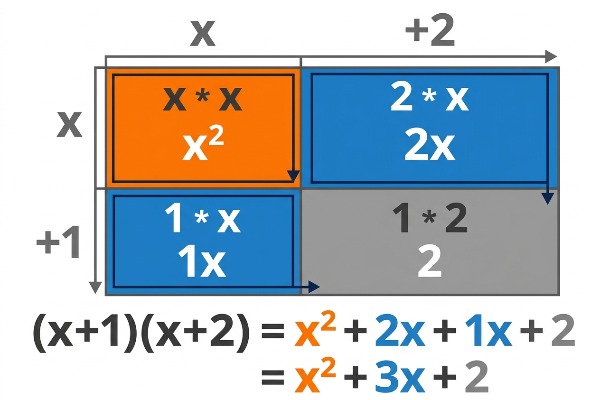
Each small box inside the grid represents the product of the term at the top of its column and the term at the left of its row. Let's fill the boxes:
- Top-left:
- Top-right:
- Bottom-left:
- Bottom-right:
Once all the boxes are filled, we will have four terms: , , , and . These terms come from multiplying each part of by each part of . To simplify the expression, we need to combine the like terms. In this case, and are like terms. Adding them together gives us . So, the expanded and simplified form of:
Another Example: Expanding using the Area Model
Let's try another example using the area model. This time, we'll expand . We'll set up our 2x2 grid again. Place the terms of the first binomial, , along the top and the terms of the second binomial, , along the left side. Remember to include the negative sign with the 1.
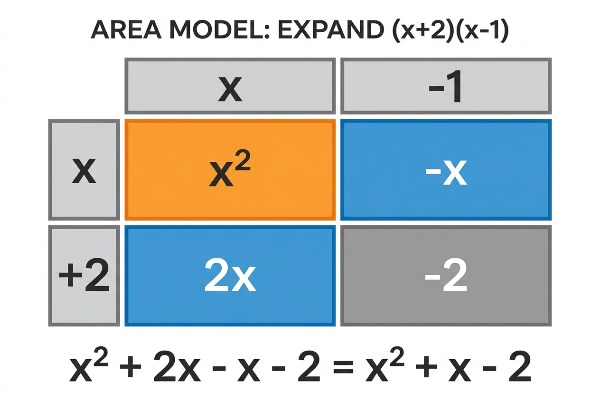
Fill in the boxes by multiplying the corresponding terms:
- Top-left:
- Top-right:
- Bottom-left:
- Bottom-right:
Now, collect the terms from the boxes: , , , and . Combine the like terms ( and ):
So, the expanded and simplified form of